The navigation menu
qwwwik does not have a navigation menu as such. The approach instead is a page with links to whichever other pages you choose. On this website the page is named info but it can be any name, such as 'menu'.
The navigation bar at the top of the pages always contains a link to the home page. Its text is set in admin/setup. Next to it, or below it on mobiles, is an optional link to search and an optional link to a contact page. When you are logged in to admin there is also an "Edit link" to edit the page.
Adding a page to the menu
A page can be added to the menu by including a plus symbol + on the first line anywhere after the hash # symbol, then 'Update page'. To remove it, remove the + symbol.
A page can also be added to the menu by writing directly in the menu file with 'Get the menu' and 'Save the menu'. It can be edited so the menu text is whatever you want. In the 'Pages' section of Admin click 'Get the menu' and add the text enclosed in square brackets immediately after the page title text, as in the following example (screenshot):
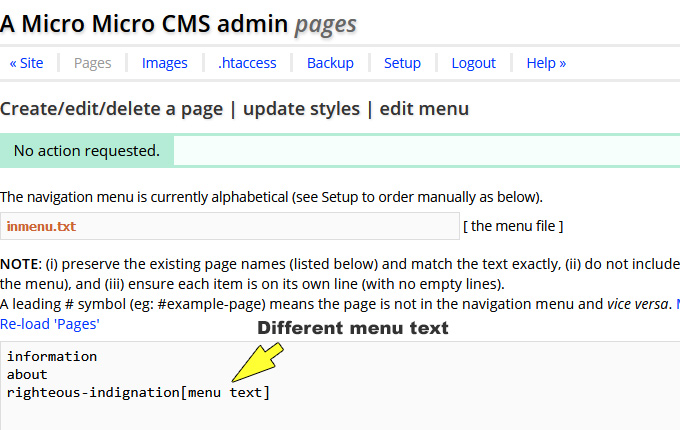
Then save the menu.
If a page name in the menu file is preceded by a # hash symbol the page will not appear in the navigation menu (and vice versa). The # hash symbol can added or removed manually with 'Get the menu' and 'Save the menu'.
For info: the menu file is /inc/inmenu.txt. The file is not in the download but is generated the first time a new page is created.
